
How to Publish a Blog (Admin)
The site admin can publish a blog within a few clicks. It is very easy to publish a video on the application site. You can also manage existing blogs whenever you want. You can follow the steps as a site admin to publish a blog on your application site.
- Log in to the application as an admin.
- Select the "Blog" option from the left menu.
- Click on the "All blogs" option from the sub-menu.

Figure 1. GoldenLMS All Blogs (Admin)
- Select the "Add new blog" button.

Figure 2. GoldenLMS Adding New Blog (Admin)
- Add blog title.
- Choose a category.
- Add some keywords.
- Write down the description.
- Upload blog banner and thumbnail. (You can upload the banner and thumbnail from your device)
- Click on the "Mark as popular" button if you want to publish your blog as popular.
- Click on the "Add blog" button to save your data.
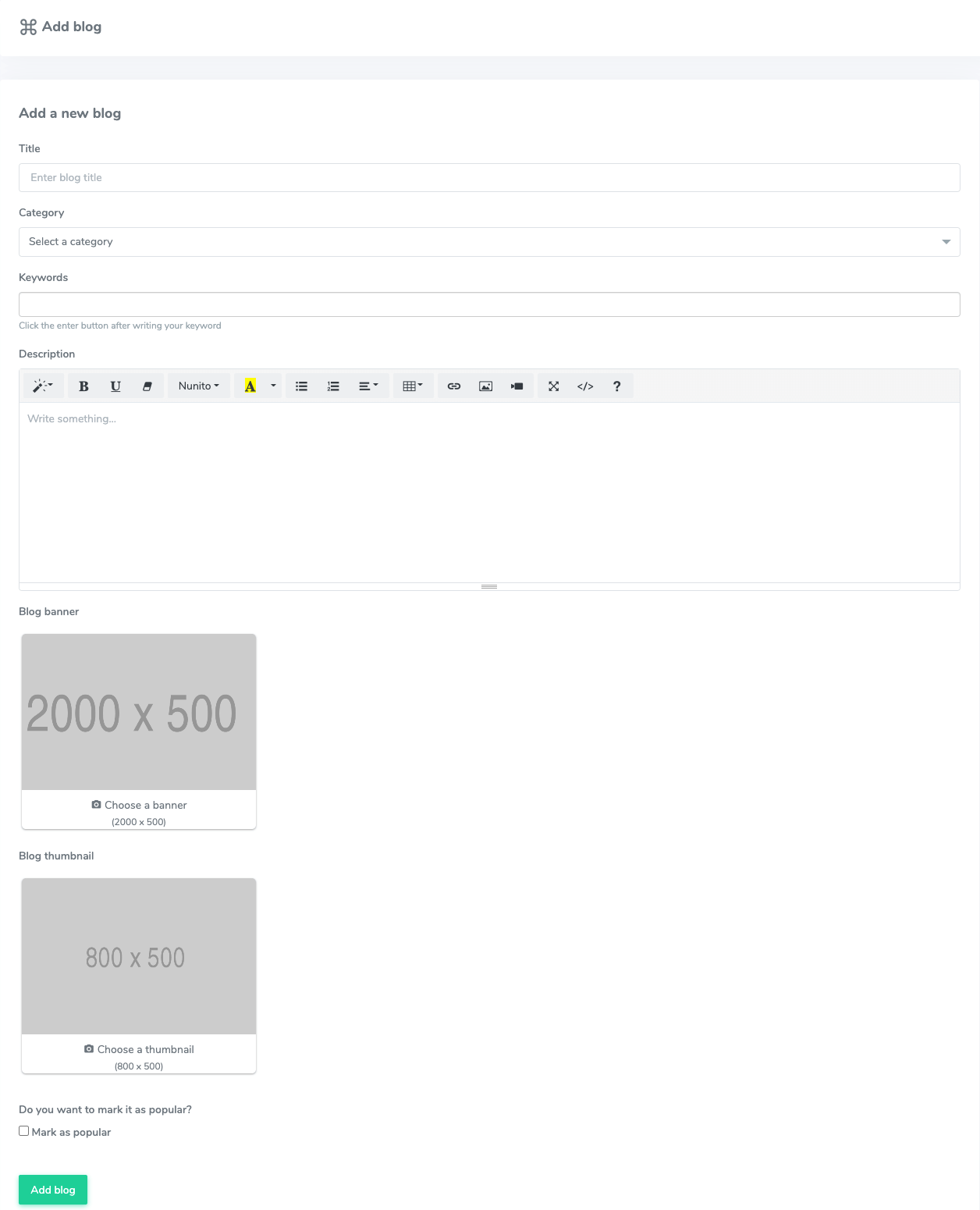
Figure 3. GoldenLMS Saving New Blog Data (Admin)
Updating blog:
To update the existing blog in your application, you can follow the steps below:
- Select a blog from the "All blogs" option.
- Click on the more options icon.

Figure 4. GoldenLMS All Blogs (Admin)
- Click on the "Edit" option.

Figure 5. GoldenLMS Updating Blogs (Admin)
- Update required information.
- Click on the "Update blog" option to save your update.

Figure 6. GoldenLMS Updating Blog Data (Admin)
Active/Inactive a blog:
In GoldenLMS, you can make a blog as active or inactive if you want. For this, you follow the steps below:
- Select a blog from the "All blogs" option.
- Click on the more options icon.

Figure 7. GoldenLMS All Blogs (Admin)
- Click on the Active/Inactive button. (If your blog is active, you can make it inactive. Or if your blog is inactive, you can make it active)

Figure 8. GoldenLMS Activating a Blog (Admin)

Figure 9. GoldenLMS Deactivating a Blog
Deleting a blog:
To delete a blog, you can follow the steps below:
- Select a blog from the "All blogs" option.
- Click on the more options icon.

Figure 10. GoldenLMS All Blogs (Admin)
- Click on the "Delete" button.

Figure 11. GoldenLMS Deleting a Blog (Admin)
- Select the "Continue" button for confirmation.